
How to pay for an order with USDT on TRON (TRC20)
Payment details are generated at checkout. Use the amount and address shown in your own payment window: another order or an old screenshot may contain different details.
1. Check your cart
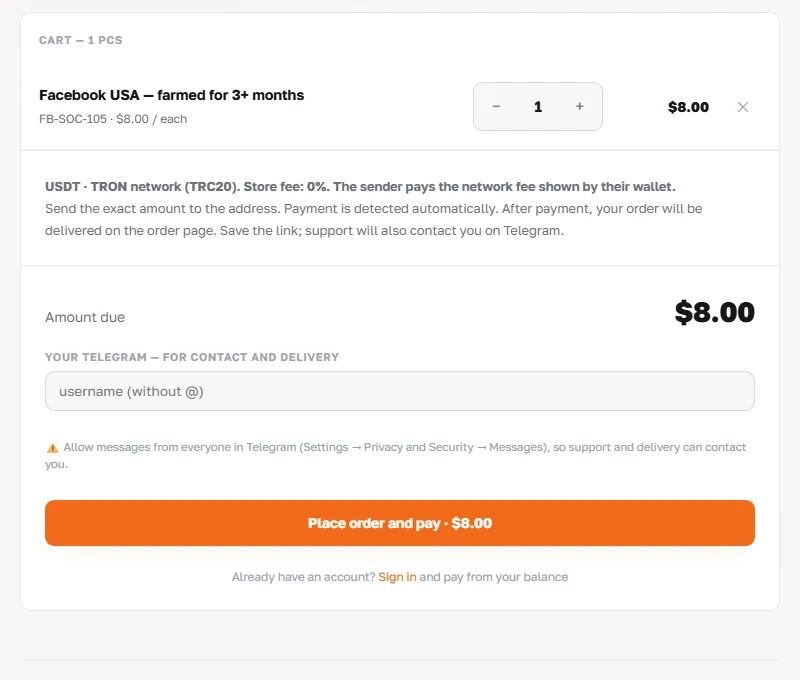
- Open the product page and check its contents, quantity and checking period. Add the quantity you need to the cart.
- For a guest purchase, enter your Telegram username. Allow messages so support can contact you about the order.
- Select “Place order and pay”. If you are buying from an account with a balance, follow the payment option shown in the cart.
2. Send the exact amount
- Copy the address and the full USDT amount from your payment window, including every decimal digit. The system uses the exact amount to identify the payment.
- In your wallet or withdrawal form, select USDT and the TRON (TRC20) network. Check the recipient address and amount before confirming.
- The service fee is 0%. The sender pays the network fee; your wallet or sending platform displays its amount and how it is charged. The recipient must receive the amount shown in the order.
- Check the timer in the payment window. If it has expired, check the order status first and use current payment details.
3. Wait for confirmation
After sending, save the TXID, the transaction identifier. The payment window checks for receipt automatically. Delivery appears after payment is confirmed; for manual delivery, follow the order status.
If you have sent the transfer but the status does not change, give support the order number, TXID, amount and sending time. A wrong amount or network requires an individual review.